
If you’d told me three years ago that I’d be editing a full YouTube video from my phone while waiting for coffee, I probably would’ve laughed. But here we are in 2026, and honestly, AI video editing tools have gotten so good that the “laptop and six browser tabs” workflow feels like ancient history.
I’ve spent the last few months bouncing between three tools that keep coming up in every creator group chat I’m part of: CapCut AI, Runway, and Pika. Each one has a different personality, if that makes sense. One’s the reliable friend who always shows up on time. One’s the ambitious artist who occasionally overpromises. And one’s the quirky experimenter who surprises you when you least expect it.
This isn’t a dry feature comparison pulled from a press release. It’s what I’ve actually noticed after editing dozens of clips, reels, and short films with all three. Let’s get into it.
Why AI Video Editing Blew Up in 2026
A couple of things happened at once. First, short-form video didn’t slow down — if anything, platforms leaned harder into it, and creators simply don’t have time to manually cut, caption, and color-grade every single clip anymore. Second, the AI models behind text-to-video and auto-editing genuinely crossed a quality threshold. Stuff that looked like a melting wax figure in 2024 now looks like actual footage.
There’s also a practical side to this. Freelancers, small business owners, and solo creators are being asked to produce more video content with smaller budgets. AI tools aren’t replacing skilled editors — they’re closing the gap for people who don’t have a full production team behind them.
Quick Comparison Table
Here’s the bird’s-eye view before we dig into each tool individually.
| Tool | Best For | Standout Feature | Learning Curve | Free Plan |
|---|---|---|---|---|
| CapCut AI | Short-form content, social media | Auto-captions, templates, one-click edits | Very easy | Yes, generous |
| Runway AI | Filmmakers, advanced creators | Gen-4 video generation, green screen AI | Moderate to steep | Limited credits |
| Pika AI (Pika Labs) | Fun, experimental video generation | Fast text-to-video, stylized motion | Easy | Limited credits |
Keep this table in mind as you read — it’s basically the cheat sheet for the rest of the article.
CapCut AI: The Editor That Feels Like It Was Built for Real Life
I’ll be upfront — the CapCut AI video editor is probably the one most people should start with, especially if you’re making content for TikTok, Instagram Reels, or YouTube Shorts.
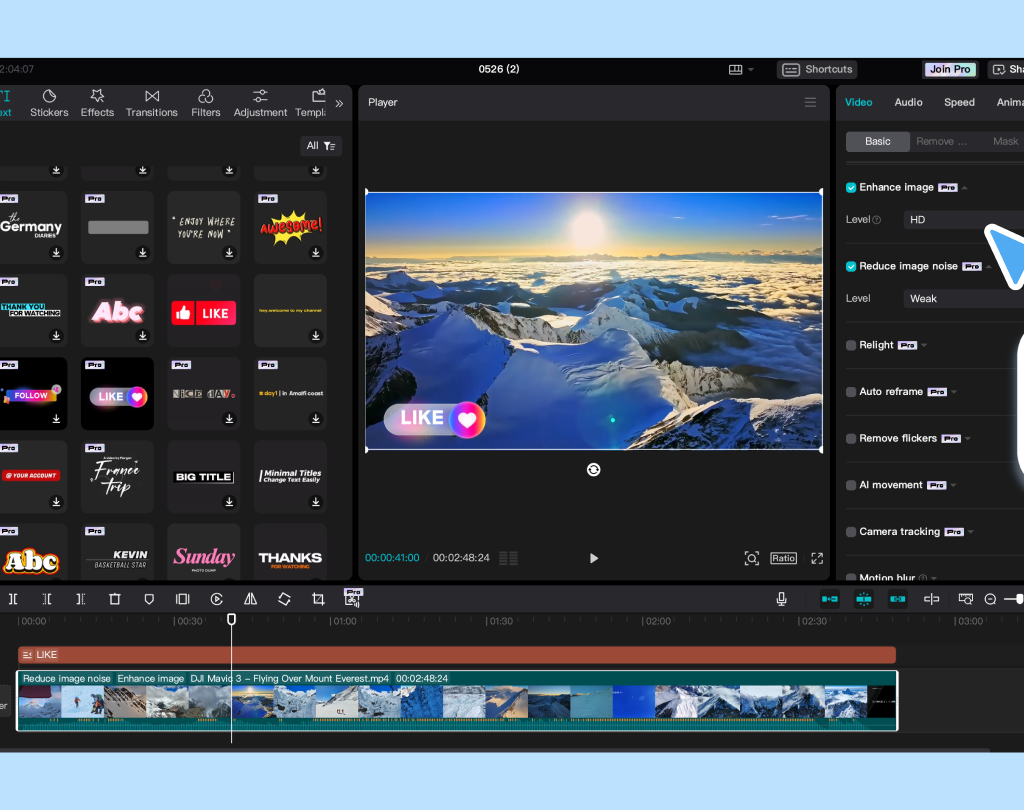
What makes it click for me isn’t any single flashy feature. It’s that everything feels designed around how creators actually work. You upload a clip, and within seconds it’s suggesting captions, transitions, and even background music that fits the vibe of your footage.
What CapCut AI Actually Does Well
- Auto-captions that don’t need fixing. The speech recognition has gotten scary accurate, even with background noise or fast talkers.
- AI-powered background removal. No green screen needed — it just knows.
- Smart templates. You drop your clips in, and it reformats everything to match trending edit styles.
- One-click reframing. Turning a horizontal video into a vertical one used to be a headache. Now it’s basically automatic.
- Voice cloning and text-to-speech. Useful if you’re narrating but don’t want to record twenty takes.
Who It’s Best For
Honestly, almost everyone. If you’re a beginner, the templates carry you. If you’re an experienced editor, the automation just saves you time on the boring parts. It’s especially strong for:
- Solo creators posting daily or several times a week
- Small business owners making product videos
- Anyone editing on a phone or tablet rather than a desktop
A Few Honest Downsides
It’s not built for cinematic storytelling. If you want deep color grading control or multi-track compositing like a traditional NLE, you’ll hit a ceiling. It’s a speed tool, not a precision tool.
Runway AI: Where Things Start Feeling Like Movie Magic
Now, Runway ML video editor is a different beast entirely. This is the tool that made a lot of indie filmmakers sit up and pay attention, and it’s the one I reach for when I want something that looks intentional rather than just quick.
Runway’s generative video models (their Gen-series) let you type a description and get an actual video clip back. It’s not perfect — motion can still get a little uncanny in longer shots — but for B-roll, concept visualization, and stylized sequences, it’s remarkably capable.
Standout Runway Features
- Text-to-video generation. Describe a scene and get usable footage, often good enough for final cut, sometimes just great for previsualization.
- AI green screen. Removes backgrounds from footage that was never shot on an actual green screen.
- Motion brush. Lets you tell specific parts of an image how to move — this one genuinely feels like sci-fi the first time you use it.
- Inpainting and object removal. Erase things from a shot without needing a VFX team.
- Frame interpolation. Smooths out choppy footage or slow-motion shots.
Who Should Use Runway
- Independent filmmakers and video artists
- Marketing teams that need concept videos fast
- Anyone experimenting with AI-generated B-roll or stylized transitions
- Creators who already know their way around editing software and want more creative control
The Trade-Offs
Runway has a steeper learning curve than CapCut. It’s also priced more like a professional tool — the free tier gives you enough credits to get curious, but you’ll likely upgrade once you’re hooked. And generation isn’t instant; complex clips can take a few minutes to render.
Pika AI: The Fun One That Keeps Surprising Me
Pika Labs’ video generator — often just called Pika AI — has this reputation for being the “fun sibling” in the AI video space, and I think that’s fair, though it undersells how useful it’s become.
Where Runway leans cinematic, Pika leans expressive. It’s fast, it’s playful, and it’s shockingly good at stylized motion — think anime-style clips, surreal transformations, or dreamy transitions that would take hours to animate by hand.
What Makes Pika Worth Trying
- Speed. Generations come back quickly, which matters when you’re iterating on an idea.
- Style range. From photorealistic to painterly to full animation, it handles a wide creative spectrum.
- Lip-sync and character animation. Getting genuinely good for talking-head style content.
- Simple prompt-to-video workflow. You don’t need technical knowledge to get a usable result on your first try.
Best Fit For
- Creators making stylized, artistic, or meme-adjacent content
- People experimenting with AI storytelling or short animated clips
- Musicians wanting quick visualizer-style videos
- Anyone who wants to test an idea fast without committing to a full production
Where It Falls Short
Longer, coherent narratives are still tricky — Pika shines in short bursts more than sustained storytelling. And like Runway, credits run out faster than you’d expect once you start generating in bulk.
How to Actually Choose Between Them
Rather than picking a “winner,” I think the smarter question is: what are you actually trying to make?
- Posting daily social content? Go with CapCut AI. It’s fast, forgiving, and built for volume.
- Working on a short film, ad concept, or need cinematic B-roll? Runway gives you the most creative control.
- Want to experiment with stylized or animated visuals without a steep learning curve? Pika is the playground.
A lot of creators I know actually use two of these together — CapCut for the final assembly and captions, Runway or Pika for generating specific shots they couldn’t otherwise film. There’s no rule saying you have to pick just one.
When Should You Use Each Tool?
Timing matters more than people think.
- Early concept stage: Pika or Runway, since you’re just testing ideas and don’t need polish yet.
- Mid-production, building your actual footage library: Runway, for consistent stylistic shots.
- Final assembly and publishing: CapCut AI, because that’s where captions, pacing, and platform formatting come together.
If you’re on a deadline, start with CapCut. Its automation genuinely gets you to a finished product the fastest, even if the results are a little less “cinematic.”
Is It Good for Beginners, Solo Creators, or Teams?
- Total beginners: Start with CapCut AI. The learning curve is close to zero, and the templates do a lot of the thinking for you.
- Solo creators building a personal brand: CapCut for consistency, with occasional Pika clips to keep content visually fresh.
- Small teams or agencies: Runway earns its price tag here — the control and quality are worth the investment when clients are involved.
- Hobbyists just having fun: Pika, hands down. It rewards curiosity more than technical skill.
Booking and Subscription Tips
A few things I wish someone had told me before I started paying for any of these:
- Test the free tier seriously before upgrading. All three offer enough free usage to judge fit — don’t skip this step just because a tool is trending.
- Watch your credit usage on Runway and Pika. Generative video eats credits fast, especially at higher resolutions or longer durations.
- Look for annual pricing once you’re sure. Most of these tools quietly offer better per-month rates if you commit annually.
- Check export resolution limits on free plans. Some free tiers watermark or cap resolution, which matters if you’re publishing professionally.
- Re-check pricing pages every few months. AI tools in this space update pricing and credit systems often — what was true last quarter might not be true now.